Provider Bulk Sync
Architecture Diagram
Overview
The Provider Bulk Sync connector runs the jobs described below, exposes three API operations, and tracks each run through a defined set of execution statuses. The diagrams in the following sections detail these flows; the tables below summarize what they reference.
Jobs
| Job | Trigger | Purpose |
|---|---|---|
| Codes Sync (Provider Codes Sync - OneKey) | Runs on a fixed schedule, and should complete before a Bulk Sync. | Loads reference codes into Salesforce as dynamic picklist values. It fetches codes from the MDM system for each configured country and upserts them to Salesforce fields, such as HealthcareProvider.ProfessionalTitle and ProviderAffiliation.Role, using the Metadata API. See Initiate Codes Sync. |
| Bulk Sync (Provider Sync - OneKey) | Started by an API request to POST /sync. | Fetches HCP and HCO provider data from the MDM system, transforms it to the Life Sciences or Health Cloud data model, and upserts it to Salesforce. Supports an initial full load and delivery-based delta syncs. Internally, records are transformed in a batch job and loaded through the queues shown in Process Data. |
| Sync Completion | Runs on a fixed schedule in the background. | Finalizes in-progress Bulk Sync jobs. It verifies that all queued records and relations have been processed and that record counts match, sets the final job status (Completed or CompletedWithError), and dispatches the next queued job. This is the End Job step in Process Data. |
| HCP Address Processing (Process_HCP_Contact_Point_Addresses) | Triggered at the end of a Bulk Sync. | A Salesforce Batch Management job that creates or updates HCP contact point addresses after provider data is loaded. |
These jobs form the connector's orchestration layer. Salesforce recommends that you don't modify the jobs or their underlying MuleSoft flows, because changes can break the sync architecture. To adjust how data is fetched and mapped, change the field mapping and the supported configuration properties in the System API instead. See the Extend Connector guide for the full list of supported changes.
API Operations
All operations are relative to the provider-sync/v1 base path.
| Operation | Method and path | Purpose |
|---|---|---|
| Initiate sync | POST /sync | Initiates a provider data sync from the MDM system to Life Sciences or Health Cloud. |
| Get job status | GET /jobs/{jobId} | Returns the current execution status and processing summary for a job. |
| Abort a running job | DELETE /jobs/{jobId} | Aborts a running job. |
Job Execution Statuses
| Status | Meaning |
|---|---|
| New | The job is accepted and initialized, but processing has not started. |
| InProgress | The job is actively fetching, transforming, and loading data. |
| Completed | The job finished and all records were processed successfully. |
| CompletedWithError | The job finished, but one or more records failed to load. |
| Failure | The job stopped because of an unrecoverable error. |
| AbortInitiated | An abort request has been accepted and termination is in progress. |
| Aborted | The job was aborted and has fully stopped. |
High Level Diagram
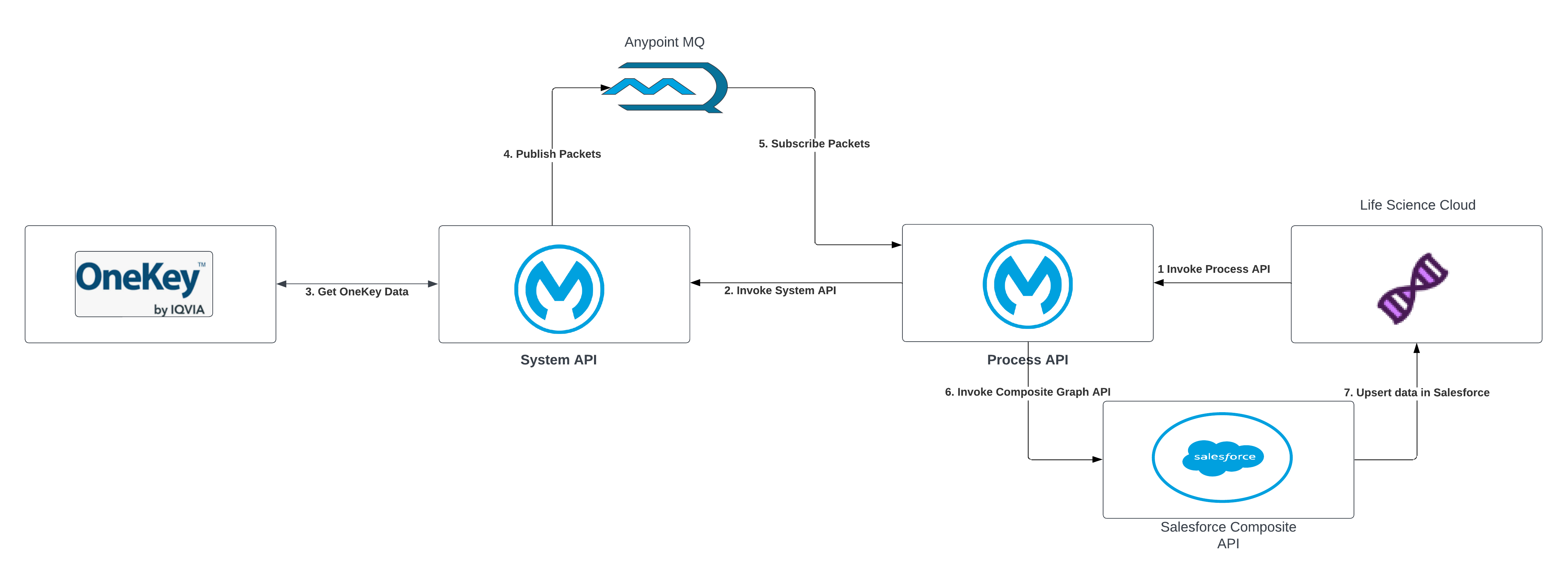
| S.No | Description |
|---|---|
| 1 | A request is initiated from Life Sciences or Health Cloud and is sent to the Process API to initiate an MDM system data sync. |
| 2 | The request to fetch data from the MDM system is sent from the Process API to the System API. |
| 3 | The System API fetches the data from the MDM system. |
| 4 | The data is fetched in a paginated format and records in each page are mapped to Salesforce entities and fields. These messages are published to Anypoint MQ. |
| 5 | The Process API subscribes to the messages from Anypoint MQ. |
| 6,7 | The data is upserted into Salesforce using the Composite Graph API. |
Design Rationale
The connector is built as two separately deployed applications, the Process API and the System API, that exchange bulk data through Anypoint MQ rather than processing it in a single application. The Process API triggers the System API with a direct request to start a sync, abort a running job, or run the codes job; from that point on, all provider data and the processing handshakes flow through the queues described below. This shape is deliberate and supports three goals.
Separation of concerns. The System API owns everything specific to the MDM system: data retrieval, transformation, field mapping, and batching. The Process API owns everything specific to Salesforce: composite writes, job orchestration, status tracking, and idempotency. Because the two applications are decoupled in this way, the mapping layer that implementers extend per country can be changed, redeployed, or scaled without touching the orchestration and write layer, and the reverse is also true.
Resilience and back-pressure. MDM delivery and Salesforce ingestion run at different speeds, and a bulk load can span a large number of records over a long window. Placing durable queues between the stages lets each side work at its own pace: a temporary slowdown or outage on one side causes messages to accumulate in the queue instead of failing the run. Because the queued messages are persistent, an application restart, deployment, or worker replacement does not lose in-flight work, and unacknowledged messages are redelivered. This is why the reconnection, acknowledgement-timeout, and redelivery settings are configured on the queues.
Parallel data, serialized control. The connector runs two kinds of queues with different concurrency models. The Data and Activity queues are processed in parallel for throughput, so multiple provider and activity messages are loaded at once. The remaining queues, which drive the job and carry the status, relations, and control handshakes, are processed one message at a time for correctness, so that jobs run one at a time, a parent Account is written before its dependent relations, and status counts are aggregated without race conditions.
Anypoint MQ Queues
Once a sync is triggered, the two applications exchange bulk data and drive the downstream processing through Anypoint MQ queues rather than by calling each other directly: the System API publishes transformed data and status messages, the Process API consumes them and writes to Salesforce, and control messages flow back to pace and finalize the job. This decoupling lets each side scale and retry independently. The queues are listed below in the order they are first invoked during a sync, and the flow diagrams refer to them by the short names shown in parentheses.
| S.No | Queue | Type of Queue | Direction | Purpose |
|---|---|---|---|---|
| 1 | onekey-sync-process-queue (Next Packet) | fifoqueue | System API to System API | Job driver. The System API publishes to this queue to fetch a data packet from the MDM system, then republishes to it after each packet until all packets are processed. |
| 2 | provider-sync-data-queue (Data) | queue | System API to Process API | Carries transformed HCP and HCO provider records to the Process API for upsert into Salesforce through the Composite Graph API. |
| 3 | provider-sync-activity-queue (Activity) | queue (delay) | System API to Process API | Carries transformed activity records to the Process API. Messages are published with a delivery delay (30 seconds by default) so that activities are processed after their related provider records are loaded. |
| 4 | provider-sync-status-queue (Status) | fifoqueue | System API to Process API | Carries per-packet processing counts and failure signals to the Process API, which updates the job status and processing summary. |
| 5 | process-relations-queue (Process Relations) | queue | System API to Process API | Signals that a packet's individual and workplace records have been transformed and that their relations are ready to be processed. |
| 6 | provider-sync-relation-queue (Relations) | queue (consume) | Process API to Process API | Holds staged relation records until the related HCP and HCO records exist in Salesforce, after which the Process API consumes them one at a time and upserts them. |
| 7 | onekey-sync-endtransaction-queue (End Transaction) | queue | Process API to System API | Signals the System API to fetch the last delivery of a multi-delivery file. This loops back to the Next Packet queue (#1). |
| 8 | onekey-sync-dispatchjob-queue (Dispatch) | queue | Process API to System API | Signals the System API to dispatch the next queued job after the current one completes. This loops back to the Next Packet queue (#1). |
The Next Packet queue (#1) is re-entrant: the System API republishes to it for each subsequent packet. The End Transaction (#7) and Dispatch (#8) handshakes also loop back to it, to fetch a file's final delivery and to start the next queued job, respectively.
Object Stores
The connector uses Object Store V2 to hold small amounts of state that must persist across messages and flows within each application. The Process API tracks job status and reuses load-time lookups; the System API coordinates job dispatch and completion. The flow diagrams refer to these stores by the short names shown in parentheses.
| Object Store | Application | Purpose |
|---|---|---|
| Status (Status OS) | Process API | Stores the current execution status and the per-resource processing summary for each job, keyed by job identifier. Written throughout the job and read by the Get Job Status operation. |
| Idempotent | Process API | Records messages that have already been processed so that a redelivered queue message is skipped instead of being loaded twice. |
| Last Packet | Process API | Tracks last-packet processing state used to determine when a job can be finalized. |
| Master Data | Process API | Caches master data records, such as specialties, created during load so that the same record is not created again within a job. |
| Codes | Process API | Caches the reference codes retrieved for the Codes Sync job. |
| Dispatch (Dispatch OS) | System API | Records active and queued sync jobs so that jobs are serialized and dispatched in order. |
| End Transaction (End Transaction OS) | System API | Marks that the last packet of a job has been reached so that the System API can finalize the transaction. |
| Abort (Abort OS) | System API | Holds the abort or failure status of a job so that in-flight processing can detect the abort and stop. |
The Process API also keeps two short-lived caches backed by Object Store V2, one for the Salesforce access token and one for Salesforce record type identifiers, to avoid repeated lookups.
Initiate Codes Sync
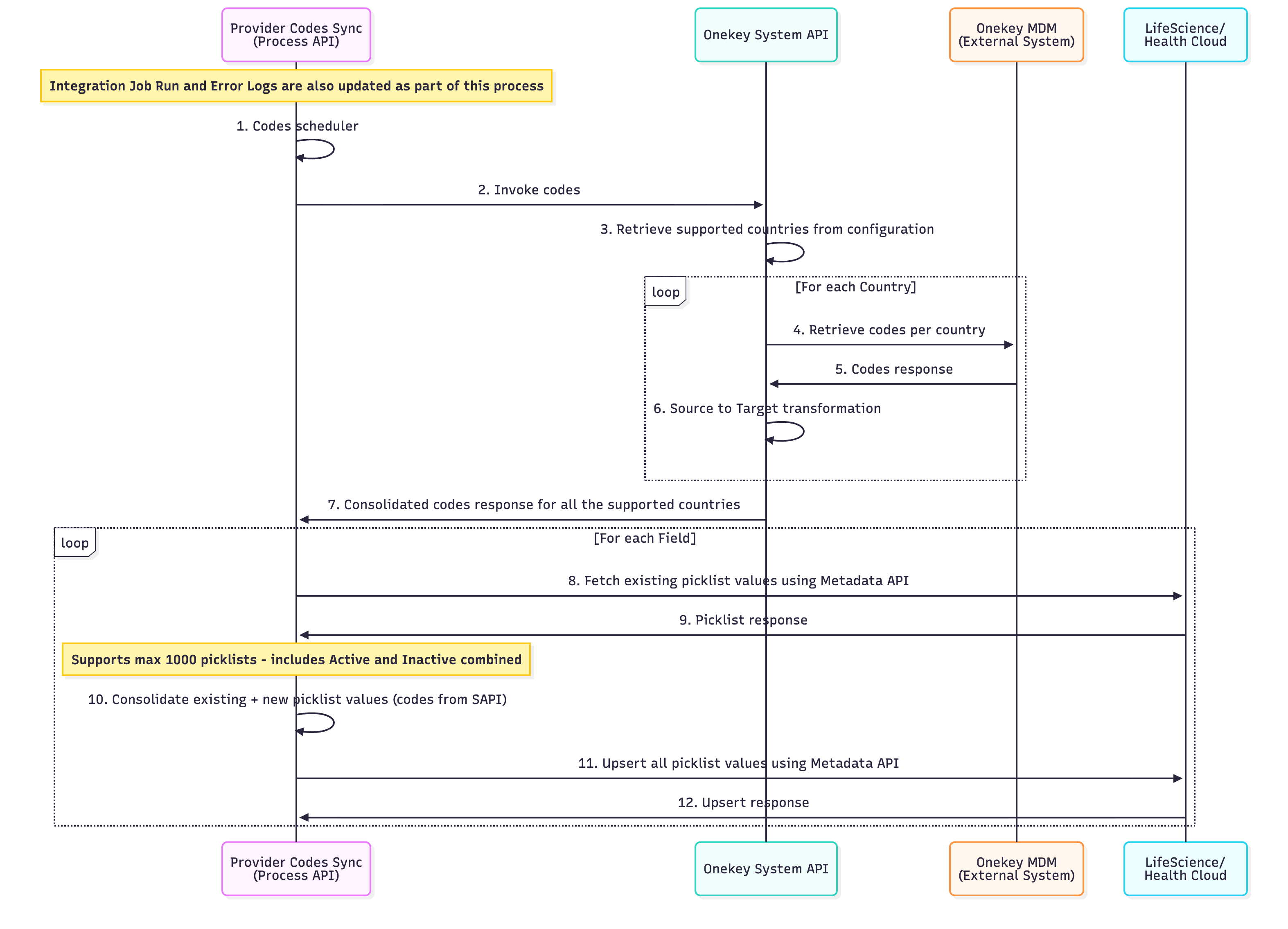
| S.No | Description |
|---|---|
| 1 | Process API initiates a scheduled job that must be completed before the Bulk Sync Process begins. |
| 2 | Process API invokes System API for Codes. |
| 3 | System API obtains the supported countries, in isoCod2 format, from the configuration. |
| 4 | System API calls the MDM system for each supported country to obtain codes. |
| 5 | MDM System provides a response with specific codes. |
| 6 | System API converts source codes to target codes using the specified codes and codeValues mapping. |
| 7 | Consolidate country-specific codes from the System API response. |
| 8 | Retrieve picklist values for each field from the System API response from Salesforce StandardValueSet using Metadata API. |
| 9 | Salesforce then provides all the corresponding picklist values for that field. |
| 10 | Combine existing Salesforce picklist values with new converted code values from the System API to create a list of codes, ensuring the total number of picklists does not exceed 1000. |
| 11 | Use the Metadata API to upsert all picklist values to Salesforce. |
| 12 | Upsert response from Salesforce. |
1. Initiate Data Sync:
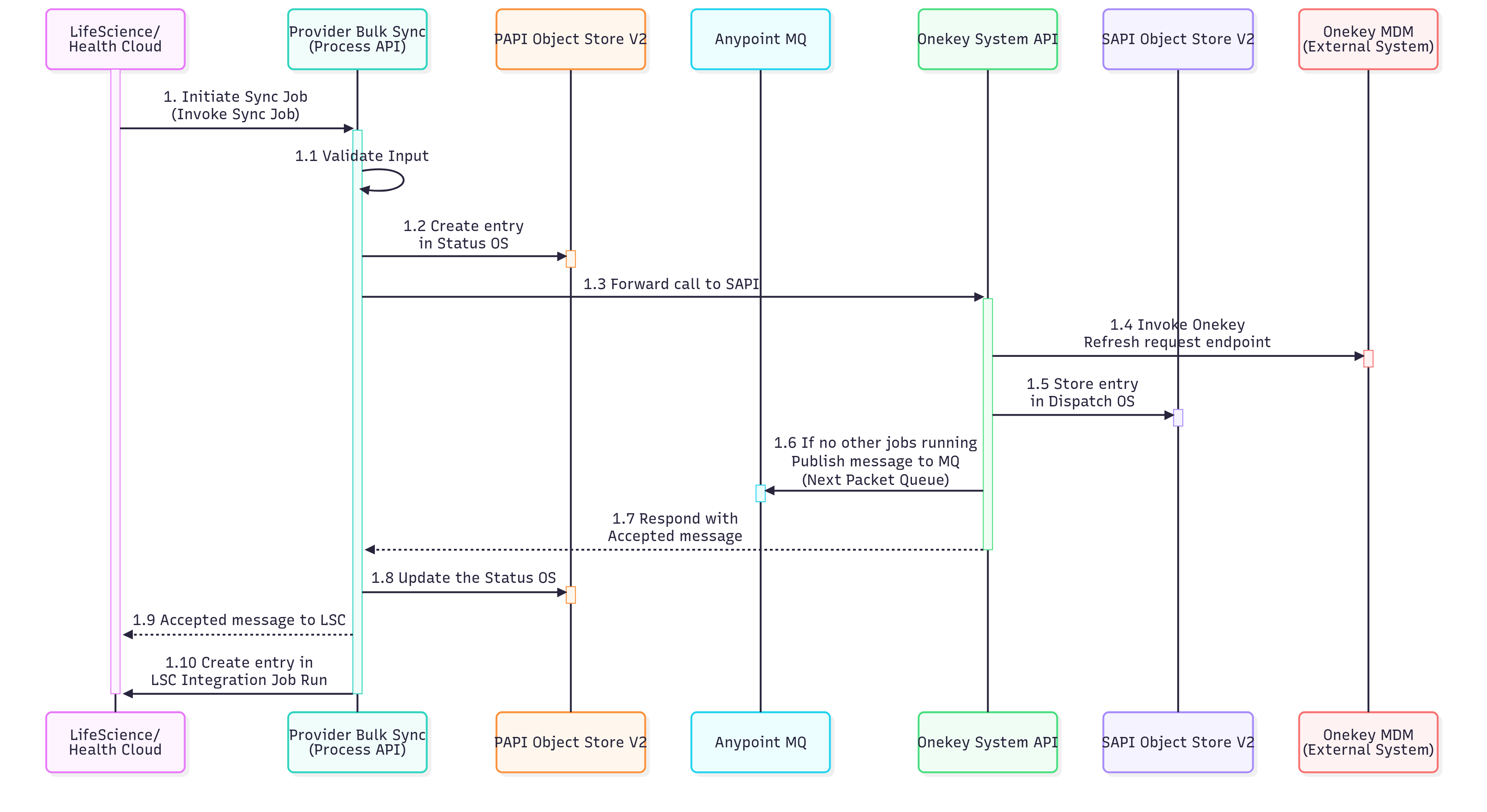
| S.No | Description |
|---|---|
| 1 | The Life Science or Health Cloud system triggers the bulk synchronization process for provider data. |
| 1.1 | The Provider Bulk Sync API validates inputs and rejects invalid requests before initiating the sync job. |
| 1.2 | The initial status for the job identifier is stored in the Status Object Store (OS) to monitor the synchronization job's lifecycle. |
| 1.3 | The request is then sent to the System API (SAPI) layer. The SAPI layer connects to the external MDM system to get provider data. |
| 1.4 | An API call is initiated to the MDM system's endpoint to verify and activate the provider's data synchronization process. |
| 1.5 | An entry for the job identifier is created in the Dispatch Object Store to manage the order of sync operations and track the processing queue. |
| 1.6 | The System API verifies if other sync jobs are active. If not, it publishes a message to the Next Packet queue, initiating the sync job's processing. |
| 1.7 | An acknowledgment response is sent back to the calling system indicating that the sync job has been successfully accepted and queued for processing. |
| 1.8 | The status object store is updated to reflect the current state of the job. |
| 1.9 | A confirmation message is sent to the Life Sciences or Health Cloud system to notify it that the sync job has been accepted. |
| 1.10 | Details of the synchronization operation are recorded in the IntegrationJobRun entity for tracking purposes. |
2. Process Data:
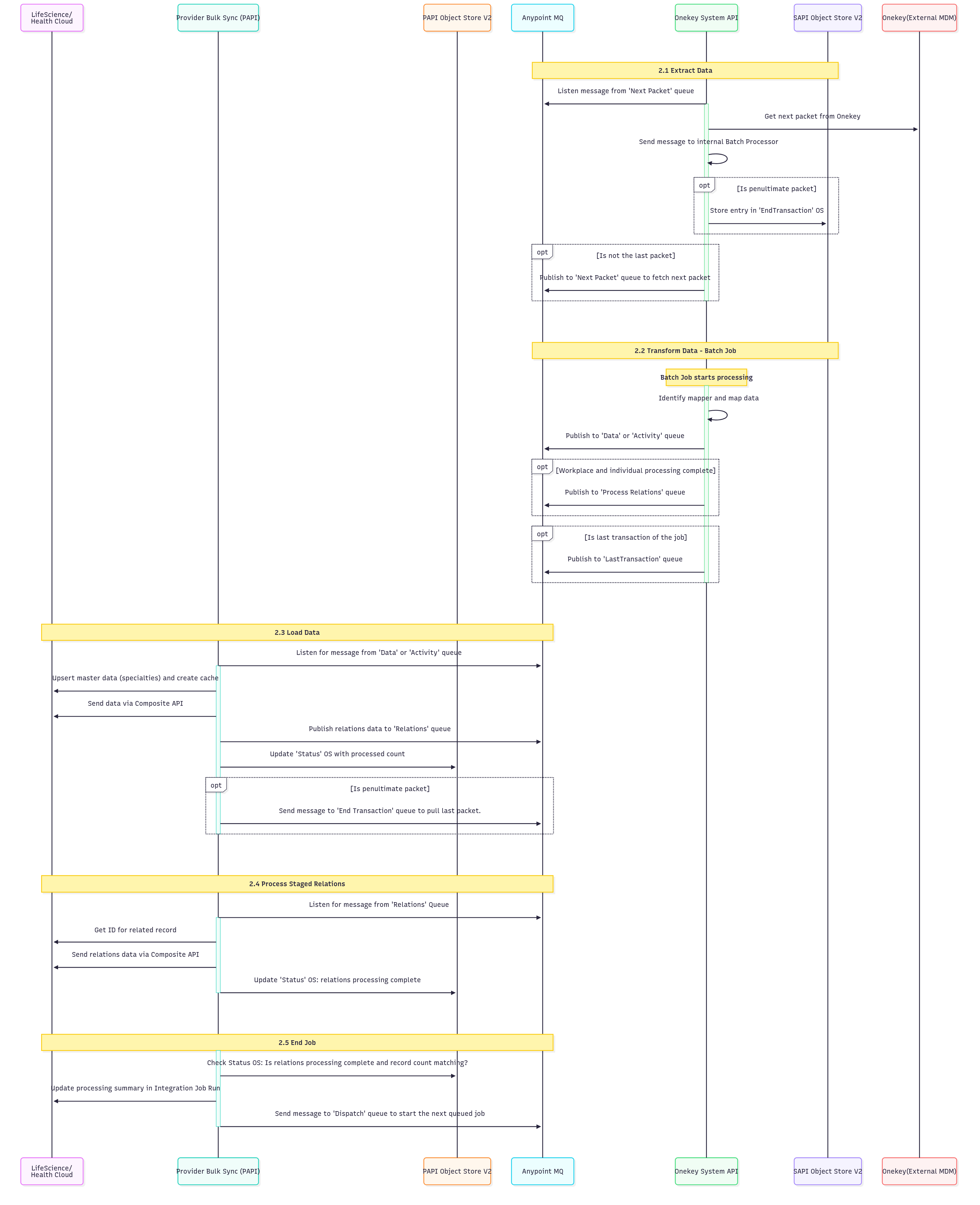
| S.No | Description |
|---|---|
| 2.1 | Data Extraction: This step manages data extraction from the OneKey system using a queue-based messaging system. It listens for messages from the Next Packet queue to retrieve the subsequent data packet from OneKey and then sends it to an internal Batch Processor. The process includes logic to identify if it's the penultimate packet (triggering an EndTransaction object store entry) or if more packets need to be fetched, it publishes to the Next Packet queue for continued processing. |
| 2.2 | Transform Data (Batch Job): This phase handles batch processing and data transformation. The batch job identifies and applies the correct data mapper, transforming data according to predefined mapping rules. The processed data is then published to either Data or Activity queues, depending on its type. Upon completion of workplace and individual processing, the data is published to the Process Relations queue. Finally, for the last message of the job, a signal of completion is published to the LastTransaction queue. |
| 2.3 | Load Data: This step manages data loading by listening to Data or Activity queues. It upserts master data (for example, specialties) and creates performance caches. The processed data is then sent via Composite API, relations data is published to the Relations queue, and the Status object store is updated with the processed record count. For penultimate packets, it triggers the End Transaction queue to retrieve the final packet. |
| 2.4 | Process Staged Relations: This step involves listening to the Relations queue for messages to process relational data. It then retrieves the IDs for related records and uses the Composite API to send the relations data, thereby establishing correct data relationships. Finally, the Status object store is updated to mark the completion of relations processing for the current batch. |
| 2.5 | End Job: The final step involves job completion validation and cleanup. It verifies the Status object store to ensure that relations processing is complete and that record counts align with expected values. Following successful validation, a message is sent to the Dispatch queue to initiate the next queued job, and the processing summary in the Integration Job Run is updated for auditing and monitoring. The HCP address processing salesforce batch job is triggered at the end to create or update HCP addresses. |
3. Handle Errors:
| S.No | Description |
|---|---|
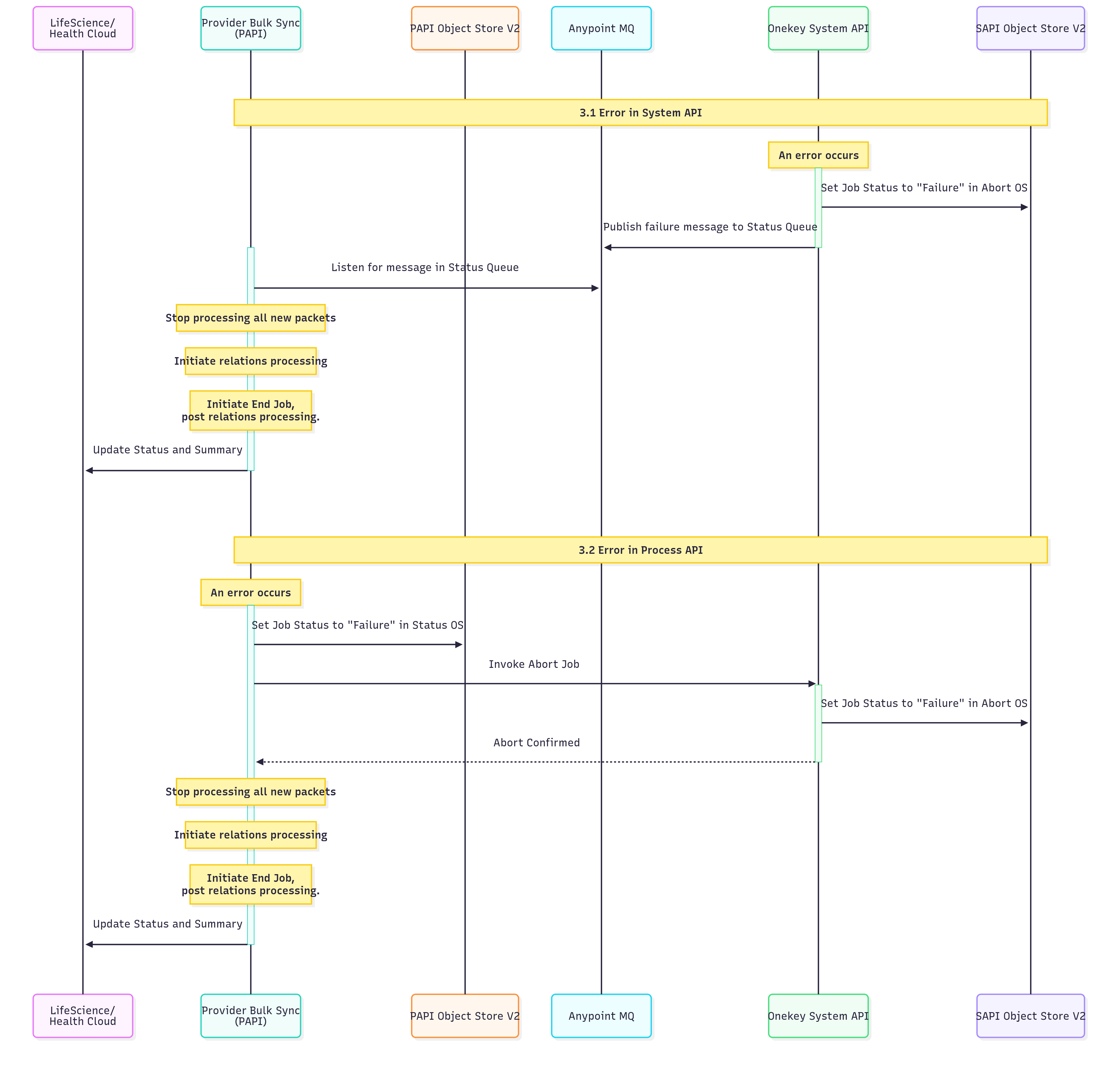
| 3.1 | Error in System API: The job status is set to Failure in Abort OS, a failure message is published to the Status Queue, and the system listens for this message in the Status Queue. Subsequently, the processing of all new packets is halted, relations processing is initiated, and End Job post relations processing is commenced. Finally, the Status and Summary are updated. |
| 3.2 | Error in Process API: The job status is updated to Failure in Status OS, followed by the invocation of Abort Job. A job in the operating system (OS) fails. This triggers the job to be canceled, and its status is updated to Failed. After the job is canceled, all new packet processing stops. The system then processes any existing relations, marks the job as ended, and updates the job's final status and summary. |
4. Get Job Status:
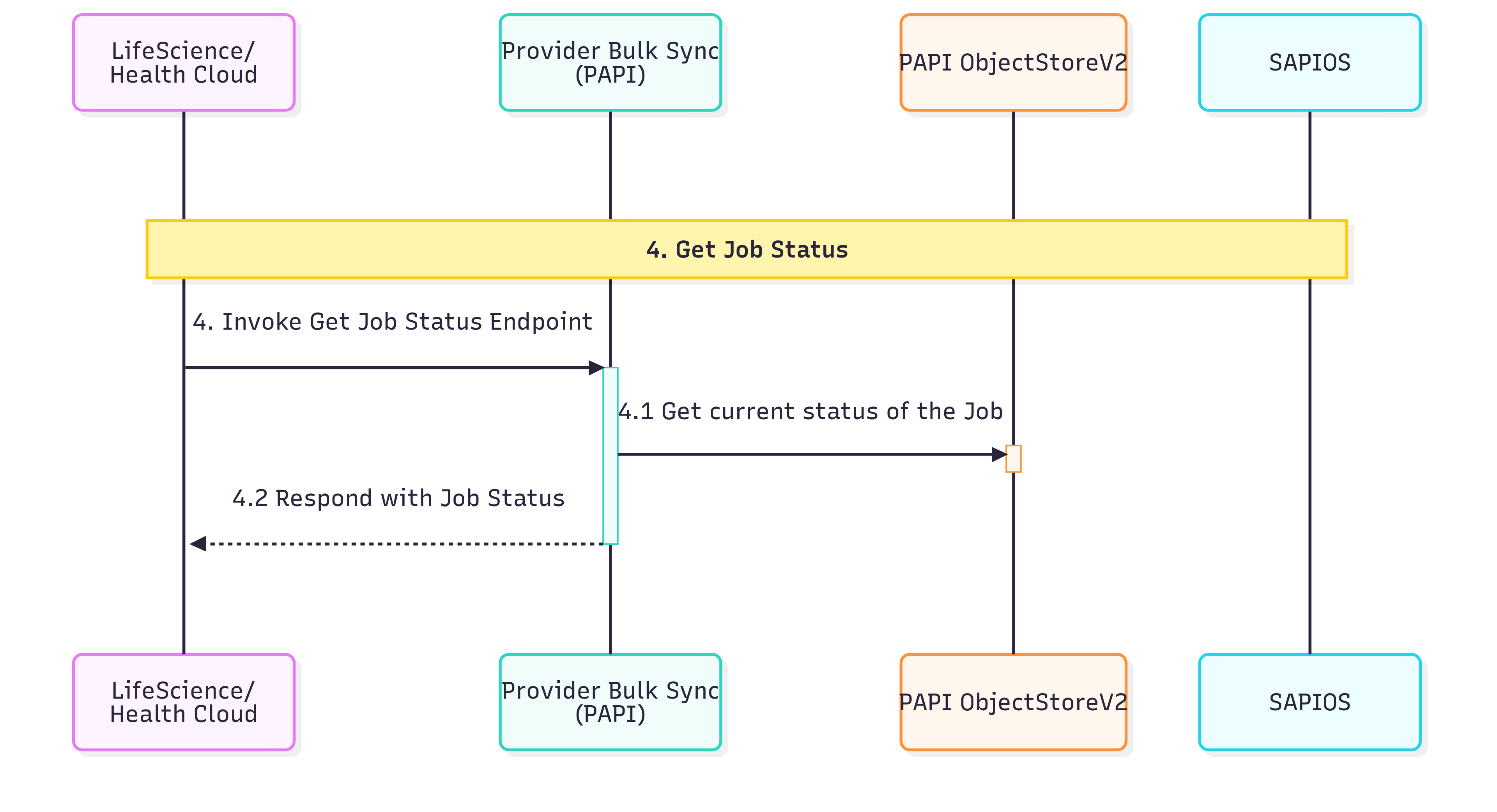
Bulk sync runs asynchronously, so Initiate Data Sync only acknowledges that the job was accepted and queued, while the actual work happens in the background in Process Data. An admin calls this operation to track that background job: to see whether it is still in progress or has finished, and to review the final status and the per-resource summary of processed, successful, and failed records.
| S.No | Description |
|---|---|
| 4.1 | This step entails querying the Status OS to obtain the current execution status of the job. |
| 4.2 | This step returns the job status information for the requested job |
5. Abort Job:
| S.No | Description |
|---|---|
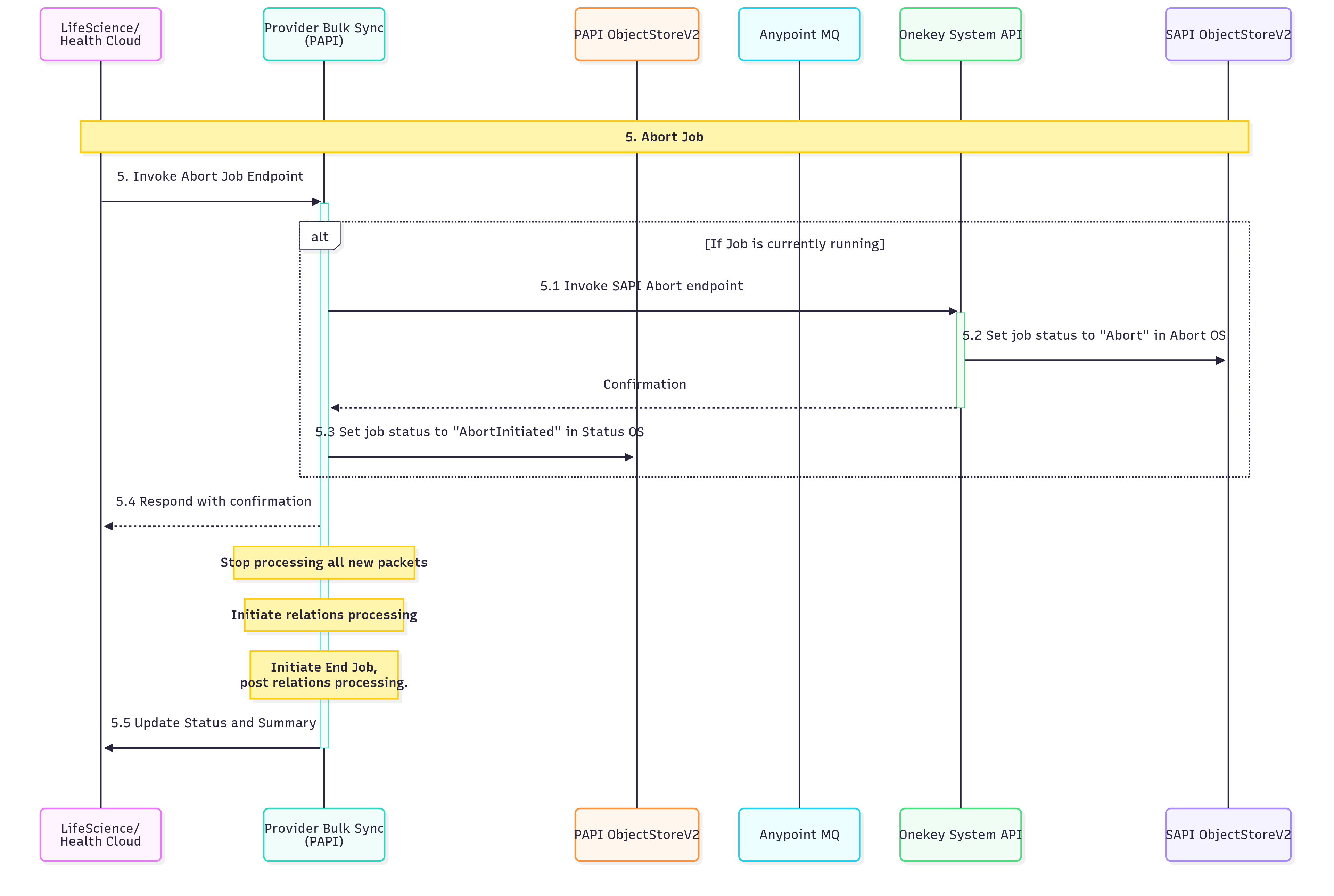
| 5.1 | Check if a job is currently in a running state. If it’s running, invoke the Service API (SAPI) abort endpoint to initiate the termination process for the active job. |
| 5.2 | Update the job status to Abort in the Abort Operating System/Service to indicate that an abort request has been processed and the job is being terminated. |
| 5.3 | Set the job status to AbortInitiated in the Status Operating System/Service to track that the abort process has been officially started and is in progress. |
| 5.4 | Send a confirmation response to the requesting entity acknowledging the abort request. Simultaneously, stop processing all new incoming packets to prevent additional work from being queued. |
| 5.4.1 | Begin the process of handling any existing relationships or dependencies that need to be resolved before the job can be completely terminated. |
| 5.4.2 | Initiate the final job termination procedures after all relations processing has been completed to ensure a clean shutdown. |
| 5.5 | Update the final job status and generate a comprehensive summary of the abort process, including any relevant metrics or completion details. |